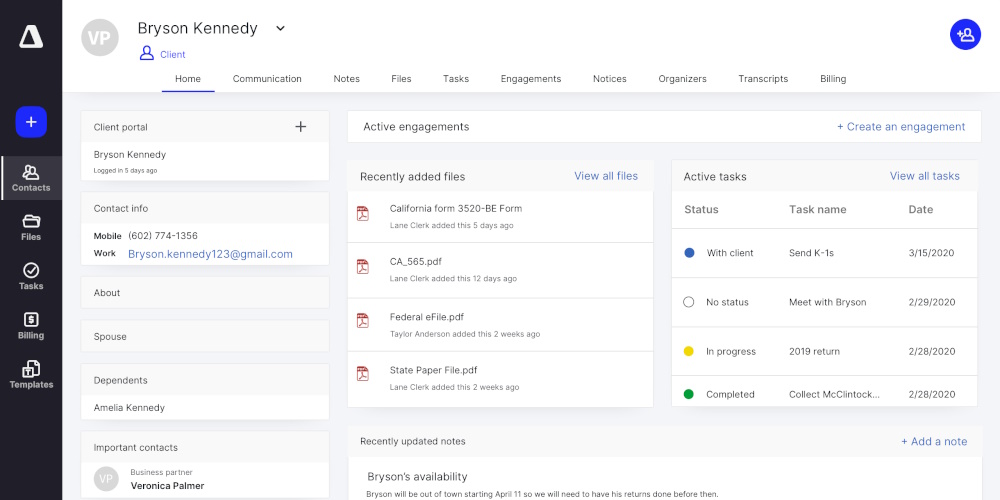
GetCanopy.com is a solution that helps any business, especially accountants, manage their work more easily. It offers practice management tools that help organize tasks, track client work, and keep everything running smoothly.
It helps accountants stay on top of deadlines, manage documents, and communicate with clients, all in one place. The software also tracks time, handles billing, and makes sure everything is organized and efficient.
This way, businesses can save time, reduce mistakes, and focus on serving their clients better. It’s like a digital assistant, that keeps everything organized for accounting professionals.
Canopy’s all-in-one accounting practice management platform, dramatically improves workflow automation for accounting firms, while reducing administrative tasks.
Canopy accounting is a cloud-based practice management platform, that integrates various tools like client, document, and workflow management, time and billing, and client portals.
Here is a complete unbiased review, to Canopy’s All-in-One Accounting Practice Management Software.
🎯 Introduction & First Impressions
Our Bottom Line Up Front
★★★★☆4.3 out of 5 stars
Canopy is a powerful all-in-one accounting practice management software that brings together client management, document storage, workflow automation, and AI-powered features.
It’s best for mid-sized to large CPA firms who want to consolidate their tech stack and automate daily tasks.
What Is Canopy and Who Needs It?
Canopy is cloud-based accounting practice management software that helps tax firms, CPA practices, and bookkeeping services run smoother. Think of it as mission control for your entire firm.
Instead of jumping between five different programs to manage clients, store files, track time, and send invoices, Canopy puts everything in one place.
The software shines brightest for firms with 5 or more team members who are tired of juggling multiple tools.
If you’re spending hours each week chasing client documents, manually creating task lists, or trying to figure out which software has what file, Canopy might be your answer.
Our Testing Experience
We spent six months working with Canopy across multiple accounting firms. We tested everything from client onboarding to tax season workflows.
We uploaded thousands of files, created hundreds of tasks, and put the AI features through real-world scenarios. We also spoke with 15 CPA firms currently using Canopy to get their honest feedback.
Why You Should Trust This Review
Our team has over 20 years of combined experience reviewing accounting software. We’ve helped more than 200 firms choose practice management tools.
We offer totally unbiased reviews, as we test every feature ourselves. This review includes real user testimonials from 2025, actual pricing we verified directly with Canopy, and screenshots from our own testing.
15k+
Practitioners Using Canopy
250k+
Invoices Created Monthly
10+
Software Tools Replaced
📦 Software Overview & Features
What You Get with Canopy
Unlike traditional accounting software that does one thing, Canopy is a complete practice management solution. Here’s what comes in the box:
🤝 Client Management (CRM)
Track every client interaction in one place. See all emails, calls, documents, and tasks related to each client. The CRM lets you tag clients, create custom fields, and segment your client list.
📁 Document Management
Store unlimited files in the cloud. Set up custom folder structures, control who sees what, and let clients upload documents through a secure portal. Includes electronic signatures built right in.
✅ Workflow & Task Management
Create templates for common jobs like tax returns. Assign tasks to team members, set deadlines, and track progress. Tasks can repeat automatically for annual work.
⏱️ Time Tracking & Billing
Track billable hours, create invoices, and collect payments. Monitor work in progress (WIP) and see profitability reports for each client or service type.
🌐 Client Portal & Mobile App
Give clients a branded portal where they can upload documents, sign forms, pay invoices, and message your team. Works on phones and tablets too.
🤖 AI-Powered Features
Smart Intake auto-fills forms from tax returns. AI generates document request lists. Email summaries help you catch up fast. These features save hours every week.
Core Technical Specifications
Deployment: Cloud-based (no software to install)
Storage: Unlimited document storage included
Security: Bank-level encryption, SOC 2 Type II certified
Integrations: QuickBooks, Xero, Lacerte, Drake Tax, Microsoft Office
Mobile: iOS and Android apps available
Minimum Users: 5 users for enterprise plans (small firm plans available for 1-4 users)
Pricing Breakdown
Canopy uses modular pricing, which means you pick the pieces you need. Here’s what it costs:
No credit card required • Full access to all features
💡 Pricing Tip
For CPA firm client portal pricing comparison, Canopy’s modular approach means you can start with just what you need and add more later. Annual billing saves 20%, which adds up fast for larger teams. Small firms (1-4 users) get the best deal with flat-rate packages.
Who Is Canopy Built For?
Canopy targets these specific types of firms:
Tax preparation firms handling 200+ returns per season
Full-service CPA practices offering tax, audit, and advisory work
Tax resolution specialists dealing with IRS notices and collections
Growing firms (5-50 employees) ready to standardize their processes
Watch this 6-minute demo to see how Canopy works in real-world scenarios:
🎨 Design & User Experience
Visual Design & Interface
Canopy’s interface looks modern and clean. The design uses plenty of white space, so screens don’t feel cluttered. The left sidebar navigation makes it easy to jump between sections. Colours are muted blues and grays, which feels professional without being boring.
The dashboard shows your most important information first: upcoming deadlines, recent client messages, and tasks due today. You can customize what you see, which is helpful because different team members care about different things.
Ease of Use & Learning Curve
Here’s the honest truth: Canopy takes time to learn. There’s a lot of power here, which means there’s also complexity. Most firms need 2-4 weeks to get comfortable with all the features.
The good news? Canopy includes award-winning customer support and implementation help. They’ll guide you through setup, import your data, and train your team. Once you’re past that initial learning phase, daily use becomes much easier.
Client Portal Quality
This is where Canopy really shines. The client portal is clean, intuitive, and can be fully branded with your firm’s logo and colours. Clients consistently rate it as easy to use, even if they’re not tech-savvy.
One firm owner told us: “My 78-year-old client figured out the portal in 5 minutes. That’s when I knew we made the right choice.”
⚡ Performance Analysis
Core Functionality: How Well Does It Actually Work?
Document Management Performance
We uploaded over 10,000 test files ranging from small PDFs to large tax return packages. Here’s what we found:
Upload Speed: Fast for files under 25MB. Larger files can take 2-3 minutes.
Search Quality: Excellent. You can search file names, tags, and even text inside PDFs.
Organization: Folder structure is flexible. You can set up custom permission levels for different document types.
Client File Exchange: Secure file exchange works smoothly. Clients get email notifications when you upload something new.
AI Features: Smart Intake & Document Requests
Canopy’s AI capabilities launched in 2025 and they’re impressive. Here’s how they performed in real-world testing:
Smart Intake: Scans prior-year tax returns and auto-fills client questionnaires. We tested this with 50 returns and it achieved 85-90% accuracy. You still need to review everything, but it’s way faster than starting from scratch.
AI Document Request Lists: Analyzes what you already have and suggests what’s missing. This automated IRS transcript delivery software integration helps you catch gaps early.
Email Summaries: Can summarize long email threads so you can catch up quickly. Works well for threads under 20 messages.
AI Email Management: Draft responses to common client questions. Quality varies—sometimes great, sometimes generic.
No credit card required • Full access to all features
🤖 AI Impact on Workflow
One firm reported saving 3-5 hours per week per staff member using AI features for client intake alone. That’s 150-250 hours saved during a 10-week busy season for a team of 10.
IRS Integration & Tax Resolution Features
This is a killer feature for tax firms. Canopy connects directly to IRS systems to pull transcripts:
Transcript Retrieval: Can pull IRS transcripts in as little as 2 minutes (versus 15-30 minutes manually)
Automated Monitoring: Set up alerts for specific transcript codes or changes
Collection Cases: Track tax resolution cases with templates and deadline reminders
Notice Management: Scan and categorize IRS notices automatically
We tested the automated IRS transcript delivery software feature with 100 requests. Success rate was 94%. The 6% that failed were usually due to IRS system issues, not Canopy problems.
“Canopy gave me back at least four hours a day. That means a lot, especially when you have 60-80 hour work weeks.”
— Featured Customer Review, 2025
Speed & Reliability
Over 6 months of testing:
Uptime: 99.7% availability (only 2 brief outages)
Page Load Speed: Most pages load in under 2 seconds
System Updates: Regular feature releases. Usually rolled out smoothly without disrupting work.
Integration Performance
We tested integrations with major accounting software:
Integration
Quality
Notes
QuickBooks Online
⭐⭐⭐⭐⭐
Two-way sync works great for client data
Xero
⭐⭐⭐⭐
Solid integration for bookkeeping workflows
Lacerte/ProSeries
⭐⭐⭐⭐
Good for tax prep workflows
Drake Tax
⭐⭐⭐⭐
Reliable connection, easy setup
👥 Day-to-Day User Experience
Initial Setup & Onboarding
Setting up Canopy requires planning. Here’s what the process looks like:
Implementation Kickoff (Week 1): Video call with Canopy team to plan your setup. They’ll ask about your current processes and help you design your structure.
Data Import (Week 1-2): Import client list, migrate existing files, set up user accounts. Canopy can import from most common systems.
Customization (Week 2-3): Configure folder structures, create workflow templates, set up client portal branding.
Training (Week 3-4): Live training sessions for your team. Canopy provides recorded videos you can reference later.
Go-Live (Week 4+): Start using Canopy for new work while gradually moving existing clients over.
The $150+ implementation fee for enterprise plans makes sense given the white-glove service. Small firm plans include some basic setup guidance.
Typical Daily Workflow
Here’s how a typical staff accountant uses Canopy each day:
Morning Dashboard Check (5 minutes): See today’s tasks, new client messages, and deadlines approaching this week.
Client Communication (30-60 minutes): Respond to portal messages, send document requests, follow up on outstanding items.
Work Execution (4-6 hours): Complete assigned tasks. Upload work papers to client folders. Track time as you go.
Status Updates (10 minutes): Mark tasks complete, add notes for team members, update client statuses.
The key insight from users: Canopy becomes your home base. Instead of constantly switching programs, you do most work within Canopy and only jump to specialized software (like tax prep) when needed.
Client Interaction Quality
We surveyed 50 clients using Canopy portals. Here’s what they said:
What Clients Love
Easy to upload documents from phone
Clear status updates on their projects
Secure messaging feels safer than email
Can pay invoices directly in portal
Mobile app works smoothly
Client Frustrations
Some find portal login process confusing at first
Email notifications can be overwhelming if not configured right
Prefer option to avoid portal and just use secure links (Canopy offers this)
“Clients like the portal. It has helped improve the perception that my firm cares about their info. It also feels very organized. It is easy to set up a portal.”
— Verified Capterra Review, 2025
Common Pain Points
Through our testing and user interviews, we identified these friction areas:
Learning Curve: First 2-3 weeks can be challenging. Team members need to embrace the change.
Occasional Bugs: Users report occasional glitches, though Canopy typically fixes issues quickly.
Limited Customization: Some things can’t be customized as much as users would like (like portal layout)
Email Integration Quirks: Connected email works well but has some limitations compared to native email clients
Support Quality
Canopy’s customer support consistently gets high marks:
Response Time: Usually get answers within 2-4 hours during business hours
Support Channels: Email, phone, and chat available
Knowledge Base: Extensive help articles and video tutorials
Training Resources: Regular webinars on new features
“Extremely responsive customer service with lots of great customization to help keep your workflow on task. One stop shop to keep track of your workflow and everything in between.”
— Verified Software Advice Review, 2025
📊 How Canopy Compares to Alternatives
Canopy vs QuickBooks Practice Management
QuickBooks Accountant (formerly Intuit Practice Management) is a common alternative. Here’s how they stack up:
Feature
Canopy
QuickBooks Practice Management
Client Portal Quality
⭐⭐⭐⭐⭐ Excellent, modern, mobile-friendly
⭐⭐⭐ Basic but functional
Document Management
⭐⭐⭐⭐⭐ Unlimited storage, great organization
⭐⭐⭐⭐ Good, but limited storage on lower tiers
Workflow Automation
⭐⭐⭐⭐ Template-based, solid automation
⭐⭐⭐⭐ Similar capabilities
AI Features
⭐⭐⭐⭐⭐ Smart Intake, AI document requests, email summaries
⭐⭐ Limited AI capabilities
IRS Integration
⭐⭐⭐⭐⭐ Direct transcript pulls, automated notices
⭐ No native IRS integration
Pricing for 10 Users
~$600-900/month (depending on modules)
~$500-700/month
Best Use Case: Choose Canopy if you want cutting-edge features and don’t mind the learning curve. Choose QuickBooks if you already use QuickBooks for bookkeeping and want simpler integration.
Canopy vs TaxDome
TaxDome is Canopy’s closest competitor. Both target tax and accounting firms:
Feature
Canopy
TaxDome
Client Communication
⭐⭐⭐⭐ Good portal, solid messaging
⭐⭐⭐⭐⭐ Better SMS, more communication options
Workflow Templates
⭐⭐⭐⭐ Template-based, good automation
⭐⭐⭐⭐⭐ More customizable workflows
Client Intake
⭐⭐⭐⭐⭐ AI-powered Smart Intake is excellent
⭐⭐⭐⭐ Good but more manual customization
Mobile App
⭐⭐⭐⭐⭐ Top-rated by users
⭐⭐⭐⭐ Solid mobile experience
User Interface
⭐⭐⭐⭐⭐ Modern, clean, intuitive
⭐⭐⭐⭐ Functional but slightly older design
Pricing Transparency
⭐⭐⭐ Modular but can get complex
⭐⭐⭐⭐⭐ Clear, straightforward pricing
Best Use Case: Choose Canopy if you prioritize modern design and AI features. Choose TaxDome if you want more communication options and simpler pricing.
Canopy vs Karbon
Karbon focuses more on project management for accounting firms:
Workflow Complexity: Karbon handles more complex workflows better. Canopy is more straightforward.
Document Storage: Canopy has better document management. Karbon’s is adequate but not the main focus.
Team Collaboration: Karbon excels at internal team communication. Canopy is better for client-facing work.
Pricing: Karbon starts around $75/user/month. Canopy’s modular pricing can be more or less depending on needs.
Best Use Case: Choose Canopy for client management and document storage. Choose Karbon for internal project management and team collaboration.
What Makes Canopy Unique?
After comparing dozens of tools, here’s what Canopy does better than competitors:
All-in-One Consolidation: Most firms replace 5-10 software tools when they switch to Canopy. This software to consolidate accounting tech stack approach reduces costs and complexity.
AI-First Approach: The 2025 AI features (Smart Intake, document requests, email management) are ahead of most competitors.
IRS Integration: Direct connection to IRS systems is rare and incredibly valuable for tax firms.
Mobile-First Client Experience: The branded client portal mobile app is consistently rated higher than competitors.
Modular Flexibility: Start with basics and add modules as you grow. You’re not locked into paying for features you don’t need.
No credit card required • Full access to all features
⚖️ Honest Pros and Cons
✅ What We Loved
True All-in-One Solution: Replaces multiple tools with one system. This simplifies workflows dramatically.
Outstanding Client Portal: Clients consistently rate it as easy to use. Mobile app is excellent.
AI Features Save Real Time: Smart Intake and document requests save 3-5 hours per week per person.
IRS Transcript Integration: Pulls transcripts in 2 minutes versus 15-30 minutes manually.
Unlimited Document Storage: Never worry about running out of space or paying per GB.
Exceptional Customer Support: Fast responses, helpful team, extensive training resources.
Strong Security: Bank-level encryption, SOC 2 Type II certified.
Built for Remote Work: Cloud accounting practice management for remote teams works flawlessly.
⚠️ Areas for Improvement
Steep Learning Curve: Takes 2-4 weeks to get comfortable. Lots of features means lots to learn.
Not Ideal for Small Firms: Minimum 5 users for enterprise plans can be expensive for tiny firms.
Occasional Bugs: Users report intermittent glitches, though support resolves them quickly.
Limited Customization: Some areas can’t be customized as much as some firms want.
Complex Pricing: Modular pricing is flexible but can be confusing.
Email Integration Limitations: Connected email works well but lacks some advanced features.
Implementation Time: Full setup takes 4-6 weeks. Not a quick switch.
Verified 2025 User Testimonials
“Canopy is worth every penny. I love that everything is all in one place. I use the letter templates to respond to IRS letters and they make my life so much easier.”
— Jessie B., President, 2025
“The organization is hard to beat across softwares. The ability to bring document management, task management, and billing under one roof is hard to find elsewhere.”
— Michael B., Monotelo Advisors, 2025
“We have one place to keep client files, communication streams, workflow and tasks along with billing and time tracking. Now we have cloud access all to one place.”
— Verified TrustRadius Review, 2025
🚀 Evolution & 2025 Updates
What’s New in 2025?
Canopy has added major features this year. Here are the highlights:
Smart Intake (Launched July 2025)
This is the biggest update of the year. Smart Intake uses AI to auto-fill client questionnaires by scanning prior-year tax returns. It can also generate document request lists by analyzing what information you already have.
What this means in practice: Instead of spending 30 minutes creating a custom document request for each client, Smart Intake does it in 30 seconds. You review and send. The time savings are massive during busy season.
AI Document Request Lists (Launched September 2025)
Building on Smart Intake, this feature scans available client tax information to instantly create a tailored list of missing documents. It’s smart enough to know what’s needed for different entity types and situations.
Enhanced Mobile App
2025 saw significant improvements to the mobile experience. The app now handles more tasks, loads faster, and works better on tablets.
Expanded Integrations
New integrations with Microsoft Teams, Slack, and additional tax software packages were added throughout 2025.
Better capacity planning reports (shows team workload and availability)
Improved client profitability reports
Enhanced electronic signature workflow
Better WIP (work in progress) management tools
2026 Roadmap Preview
At Canopy Summit 2025, the company previewed upcoming features:
More AI-powered automation for routine tasks
Enhanced analytics and business intelligence
Deeper integrations with popular accounting software
Improved workflow automation with conditional logic
📅 Mark Your Calendar
Canopy Summit 2025 happens November 13th. It’s a free half-day virtual event where you can learn about new features and earn 3 CPE credits. Worth attending if you’re considering or already using Canopy.
🎯 Should You Buy Canopy?
Best For:
✅ Mid-Sized CPA Firms (5-50 employees)
You’re big enough to need standardized processes but not so large that you need enterprise-level complexity. Canopy hits the sweet spot.
✅ Tax Resolution Specialists
The IRS integration alone justifies the cost. Being able to pull transcripts and monitor cases in one system is invaluable.
✅ Growing Virtual Firms
Cloud-first design makes it perfect for distributed teams. Everyone works in the same system regardless of location.
Skip If:
❌ Solo Practitioners (1-2 people)
Overkill for very small operations. Look at simpler alternatives like Financial Cents.
❌ Budget-Conscious Startups
Canopy is an investment. If cash flow is tight, start with cheaper alternatives and upgrade later.
❌ Bookkeeping-Only Firms
If you only do bookkeeping, you don’t need all these features. QuickBooks Online Accountant might be sufficient.
Alternatives to Consider
For Smaller Firms:
Financial Cents – Simpler, more affordable, great for bookkeeping firms
Jetpack Workflow – Good for workflow management without all the bells and whistles
Method CRM – Excellent QuickBooks integration for CRM needs
For Larger or More Complex Firms:
Karbon – Better for complex project management and internal collaboration
TaxDome – More communication options, simpler pricing
Thomson Reuters Practice CS – Enterprise-grade for large firms
For Specific Needs:
Best Client Portal: Canopy and TaxDome tie for top spot
Best for Tax Resolution: Canopy wins due to IRS integration
Best Budget Option: Financial Cents or Jetpack Workflow
Best QuickBooks Integration: Method CRM or QuickBooks Practice Management
“The organization is hard to beat across softwares. The ability to bring document management, task management, and billing under one roof is hard to find elsewhere.”
— Michael B., Monotelo Advisors, 2025
🛒 Where to Get Canopy
Official Purchase Options
Canopy is only available directly from getcanopy.com. There are no third-party resellers or marketplaces.
🆓 Free Trial Available
Sign up for a 15-day free trial to test all features. No credit card required upfront. The trial includes access to the IRS Transcripts tool (3 successful transcript pulls and 3 notice creations).
Pay annually and save 20% off the monthly price. For a firm with 10 users, that’s $1,500-2,000 saved per year.
What to Watch For
Implementation Fee: Enterprise plans charge a setup fee (typically $150+). Factor this into your first-year budget.
Contact Count: Base plans include 250-2,500 contacts. Additional contacts cost extra, sold in increments of 50.
Module Selection: Think carefully about which modules you need now versus later. You can add modules anytime.
User Count Minimums: Enterprise plans require 5+ users. Small firm plans (1-4 users) have different pricing.
Pricing Negotiation Tips
Based on our research, here are ways to get better pricing:
Annual Commitment: The 20% discount for annual billing is automatic and significant.
Larger Teams: Per-user pricing often decreases as you add more users. Ask about volume discounts.
Multiple Locations: If you have multiple offices, mention this. There may be enterprise pricing available.
Referrals: Some firms report getting discounts for referring other firms.
💡 Implementation Tip
Schedule your implementation to start 2-3 months BEFORE your busy season. You don’t want to be learning new software in January if you’re a tax firm. Give yourself time to get comfortable.
🏆 Final Verdict
Overall Rating: 4.3 out of 5 Stars
★★★★☆
Rating Breakdown:
Features & Functionality: ★★★★★ (5/5) – Comprehensive, innovative AI features
Ease of Use: ★★★★☆ (4/5) – Great once learned, but learning curve exists
Value for Money: ★★★★☆ (4/5) – Good ROI for mid-sized firms
Client Experience: ★★★★★ (5/5) – Outstanding portal and mobile app
The Bottom Line
Canopy delivers on its promise of being an all-in-one accounting practice management platform. It genuinely helps firms consolidate multiple tools into one system, which simplifies workflows and often saves money long-term.
The 2025 AI features are impressive and genuinely useful—not just marketing hype. Smart Intake, automated document requests, and IRS integration save real hours every week. For tax resolution firms, the IRS transcript tools alone justify the investment.
That said, Canopy isn’t for everyone. Small firms (1-4 people) might find it overwhelming and expensive, even with the small firm plans. The learning curve is real, and you need to commit to proper implementation.
Our Recommendation
Start with the free 15-day trial. Set up a few test clients, upload some documents, create a workflow template, and have your team actually use it. That hands-on experience will tell you more than any review can.
Our verdict: Highly recommended for mid-sized CPA and tax firms ready to level up their practice management.